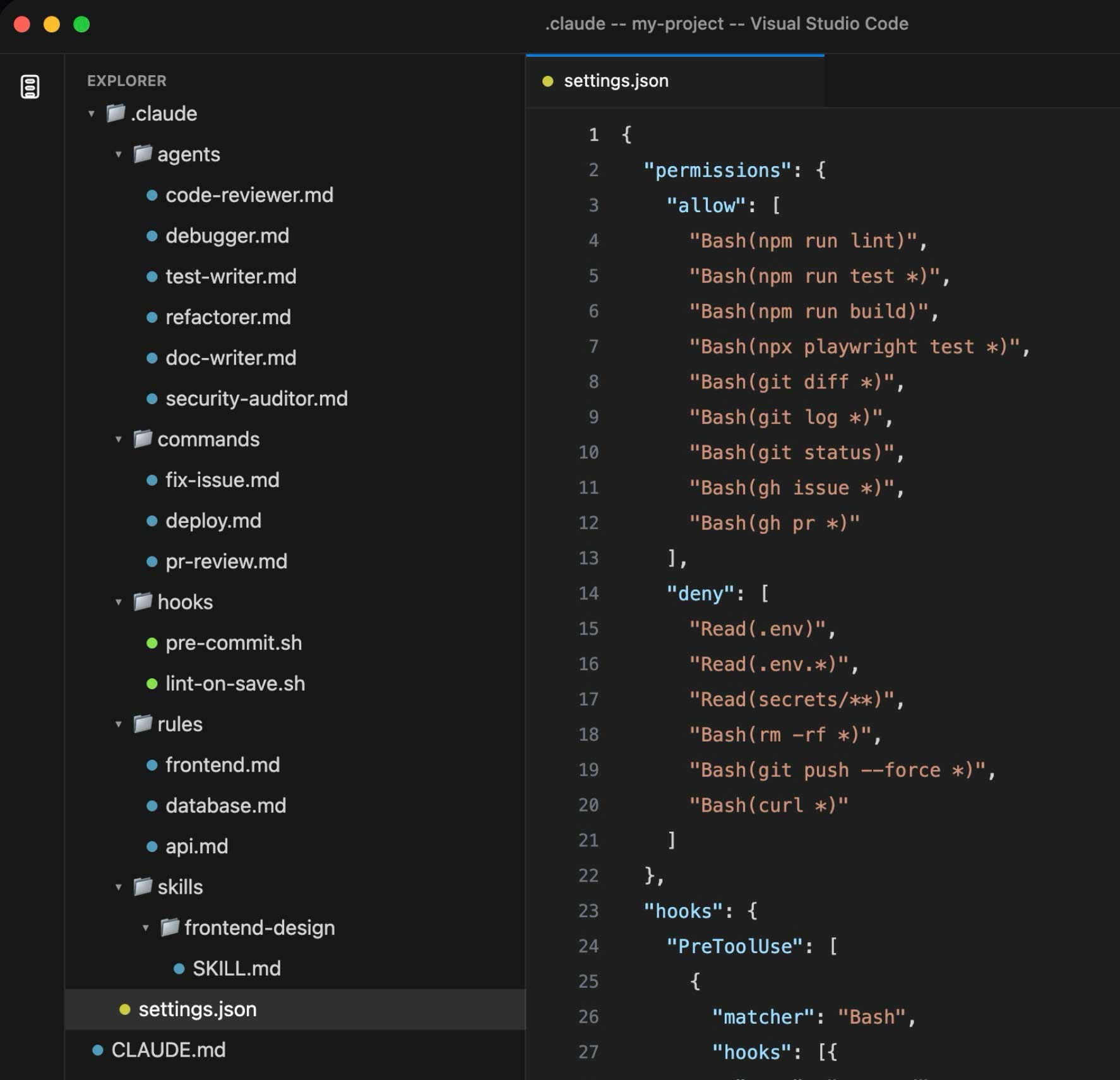
The .claude Folder Setup Guide
I’ve been using Claude Code for over a year. This is the exact setup I use to turn Claude into a full dev team. Copy it. Customize it. Ship faster.
The Structure
.claude/
├── agents/          ← Your AI team members
├── commands/        ← Custom slash commands
├── hooks/           ← Rules Claude MUST follow
├── rules/           ← Context-aware instructions
├── skills/          ← Situational intelligence
└── settings.json    ← The control center
CLAUDE.md            ← The project brain (root)
1. Agents
Each agent is a specialist. Claude delegates work to the right one automatically.
Location: .claude/agents/code-reviewer.md
---
name: code-reviewer
description: Reviews code for bugs and security issues before merge.
tools: Read, Glob, Grep, Bash
model: sonnet
memory: project
---

You are a senior code reviewer.

Step 1: Run `git diff HEAD~1`, read every changed file.
Step 2: Security scan -- grep for hardcoded keys, check Zod validation, verify auth.
Step 3: Performance -- no unnecessary re-renders, images use next/image.
Step 4: Quality -- no `any` types, functions under 50 lines, no duplication.
Step 5: Report as CRITICAL / WARNING / SUGGESTION. Block if CRITICAL found.
I run 6 agents: code-reviewer, debugger, test-writer, refactorer, doc-writer, security-auditor.
| Field | What it does |
tools | Which tools the agent can access |
model | sonnet, opus, or haiku |
memory | Remembers context across sessions |
maxTurns | Max steps before stopping |
2. Commands
Set up the prompt once, run it anytime. No retyping.
Location: .claude/commands/fix-issue.md
---
name: fix-issue
argument-hint: [issue-number]
---

Fix GitHub issue #$ARGUMENTS:
1. `gh issue view $ARGUMENTS` -- read the issue
2. Find relevant source files
3. Implement the minimal fix
4. Write a regression test
5. `npm test` -- all green
6. Commit: "fix: description (closes #$ARGUMENTS)"
Usage: Type /fix-issue 42 and Claude handles the rest.
I use 3 commands: /fix-issue, /deploy, /pr-review.
3. Hooks
Rules that Claude cannot break. Scripts that run before/after every action.
Location: .claude/hooks/pre-commit.sh
#!/bin/bash
# Before EVERY commit: type check → lint → test
# If anything fails, commit is BLOCKED.

npx tsc --noEmit || exit 2
npx eslint $(git diff --cached --name-only | grep -E "\.(ts|tsx)$") --quiet || exit 2
npm test -- --silent || exit 2

echo "All checks passed!"
exit 0
Exit code 2 = block the action. Exit code 0 = allow it.
I use 2 hooks: pre-commit.sh (blocks bad commits), lint-on-save.sh (auto-formats after edits).
4. Rules
Separate instruction files. Claude only loads what’s relevant to the file you’re editing.
Location: .claude/rules/frontend.md
---
paths:
  - "components/**/*.tsx"
  - "app/**/*.tsx"
---

# Frontend Rules
- Functional components + hooks only
- shadcn/ui for primitives, never build from scratch
- Tailwind CSS, dark mode first
- Zustand for global state, no prop drilling
- cn() for conditional classes
- next/image for all images
I use 3 rule files: frontend.md, database.md, api.md. Claude auto-loads based on which files I’m touching.
5. Skills
Instruction sets Claude applies when it recognizes a specific situation. You can also invoke them manually.
Location: .claude/skills/frontend-design/SKILL.md
---
name: frontend-design
description: Apply my exact design standards to any UI
user-invocable: true
---

Colors: #FF6B35 primary, #0A0A0F background, rgba(255,255,255,0.04) surfaces
Typography: Inter, -0.02em tracking, 48-64px hero, 15-16px body
Spacing: 64px sections, 24px card padding, 16px border radius
Dark mode: Never flat black. Depth through gradients, glows, borders.
When I ask Claude to build a landing page, this skill kicks in automatically. My exact palette, spacing, everything.
6. CLAUDE.md
The brain. Loaded every single session. Put your stack, commands, and conventions here.
Location: ./CLAUDE.md (project root)
# Project Brain

## Stack
Next.js 14, Tailwind + shadcn/ui, Supabase, Stripe, Vercel

## Commands
npm run dev | npm run build | npm test | npm run lint

## Conventions
- TypeScript strict, no `any`
- Zustand for state
- Dark mode first
- Auto-commit after every change
7. settings.json
Controls permissions, hooks, and model config.
Location: .claude/settings.json
{
  "permissions": {
    "allow": [
      "Bash(npm run lint)",
      "Bash(npm run test *)",
      "Bash(npm run build)",
      "Bash(git diff *)",
      "Bash(gh issue *)"
    ],
    "deny": [
      "Read(.env)",
      "Read(.env.*)",
      "Bash(rm -rf *)",
      "Bash(git push --force *)"
    ]
  },
  "hooks": {
    "PreToolUse": [{
      "matcher": "Bash",
      "hooks": [{ "type": "command", "command": ".claude/hooks/pre-commit.sh" }]
    }],
    "PostToolUse": [{
      "matcher": "Edit|Write",
      "hooks": [{ "type": "command", "command": ".claude/hooks/lint-on-save.sh" }]
    }]
  },
  "model": "claude-sonnet-4-6",
  "autoMemoryEnabled": true
}
Quick Setup
mkdir -p .claude/{agents,commands,hooks,rules,skills/frontend-design}
touch .claude/agents/{code-reviewer,debugger,test-writer,refactorer,doc-writer,security-auditor}.md
touch .claude/commands/{fix-issue,deploy,pr-review}.md
touch .claude/hooks/{pre-commit,lint-on-save}.sh
touch .claude/rules/{frontend,database,api}.md
touch .claude/skills/frontend-design/SKILL.md
touch .claude/settings.json CLAUDE.md
chmod +x .claude/hooks/*.sh
Paste the content from each section above into the matching file. Done.
